# Permission syncing
Permission syncing is a polling mechanism, that periodically checks via an API call to the code
host to determine which permissions of a specific entity has. We have 2 ways to sync
permissions. Both are on by default, resulting in double polling:
- **user-centric** permission syncing, where we ask the code host for a list of repositories that a specific user has read access to
- **repo-centric** permission syncing, where we ask the code host for a list of users that can access a specific repository
Sourcegraph collects this information and stores it in internal database.
To see which code hosts support permission syncing, please refer to [Supported code hosts table](/admin/#supported-code-hosts).
## How it works
### Periodic sync
The permission syncing mechanism can be divided into 2 processes:
1. The job scheduler migrated to a database backed worker in v4.5
2. The permission sync job
There is a scheduler and job queue for both user-centric and repo-centric sync jobs, both run in parallel.
### On-demand sync
Besides periodic schedule of jobs, we also have a way to request permission sync for a user
or repository on-demand. This is useful for example when a new user is added to Sourcegraph.
To do that, the following GraphQL request needs to be made:
```graphql
mutation {
scheduleUserPermissionsSync(user: "user") {
alwaysNil
}
}
```
Or in the case of adding a repository, the following request is made:
```graphql
mutation {
scheduleRepositoryPermissionsSync(repository: "repository") {
alwaysNil
}
}
```
**Example**:
- User `bob` is added to Sourcegraph.
- `bob` has access to repositories `horsegraph/global` and `horsegraph/bob` on the code host
- an on-demand request is made to sync repository permissions of `bob`, this job is added to the queue with high priority, so it will be processed
quicker than jobs with lower priority
- by the time `bob` actually logs into Sourcegraph, the permissions should already be synced with this on-demand job.
### Scheduling
A variety of heuristics are used to determine when a user or a repository should be
scheduled for a permissions sync to ensure the permissions data Sourcegraph has is up to date.
Permissions syncs are regularly scheduled in these scenarios
- When a user or repository is created [as seen above](#on-demand-sync)
- When certain interactions happen, such as when a user logs in or a repository is visited
- When a user or repository does not have permissions in the database
- When a user or repository permissions are stale (i.e. some amount of time has passed since the last sync for a user or repository)
- in this case, Sourcegraph schedules a certain amount of users/repositories with oldest permissions on each scheduling interval.
When a sync job is scheduled, it is added to a priority queue that is steadily
processed. To avoid overloading the code host a sync job [might not be processed immediately](#sync-duration)
and depending on the code host, might be heavily rate limited.
Priority queue is needed to process the sync jobs in the order of most important first. E.g.:
- on-demand sync is high priority
- sync of entities with no permissions is high priority
- sync of oldest permissions is normal priority, since we already do have some permissions in the system
### Mapping code host identifiers
To identify which Sourcegraph users or repositories the permissions relate to, we need to map the
users identifiers from code host with userIDs on Sourcegraph and similarly for repository
identifiers from code host to repoIDs on Sourcegraph side.
> WARNING: For this process to work correctly, the user needs to have an external account
> from code host mapped to the user account on Sourcegraph, otherwise the code host
> identifier cannot be matched and repository permissions cannot be enforced.
This is the main reason to require users to connect to their code host. This
can be done on the Account security settings page: `/settings/security` - redirects to your settings.
### Entities that do not exist on Sourcegraph
There might be cases, when the identifiers on the code host do not match any user or repository on Sourcegraph side.
In that case, Sourcegraph still stores the permission information in the internal database as **pending permissions**
In case that an entity with the same code host identifier is added later, Sourcegraph applies these pending permissions.
**Sourcegraph only keeps pending permissions for repositories that were added to Sourcegraph.**
We will never store information about repositories that are not shared with us.
If everything works correctly in such a case, [on-demand sync request](#on-demand-sync)
is not strictly needed. But the permissions of the entity might have changed in the time
since the last sync of these pending permissions, so it is safer to make the request
anyway to keep the permissions as fresh as possible.
## SLA
Sourcegraph SLA is, that the time it takes for permissions from code host to be synced via permission syncing
to Sourcegraph is the same as the [lag-time](#lag-time) defined below. So as long as a full cycle of permission syncing takes.
## Checking permissions sync state
### Verify via UI
Sourcegraph 5.0+
The state of user or repository permissions can be checked directly in the Sourcegraph UI.
**User permissions**
1. Click on your avatar in top right corner of the page
1. Navigate to **Settings > Permissions** (Or URL path `/settings/permissions` - redirects to your settings)
1. The permissions page should look similar to: 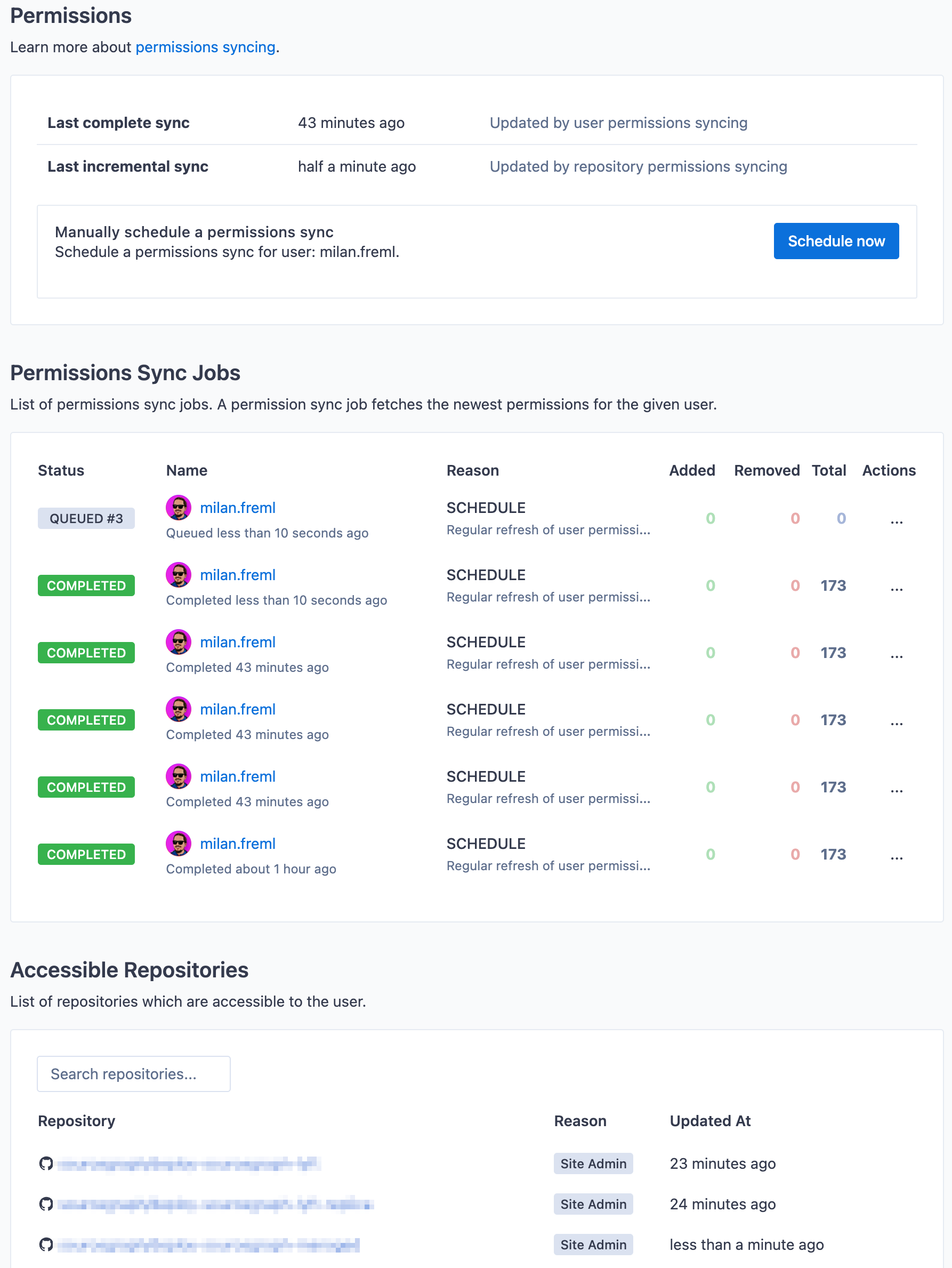
**Repository permissions**
1. Navigate to the repository page
1. Open **Settings > Permissions** (Or URL path `/$CODEHOST/$REPO/-/settings/permissions`)
1. The permissions page should look similar to: 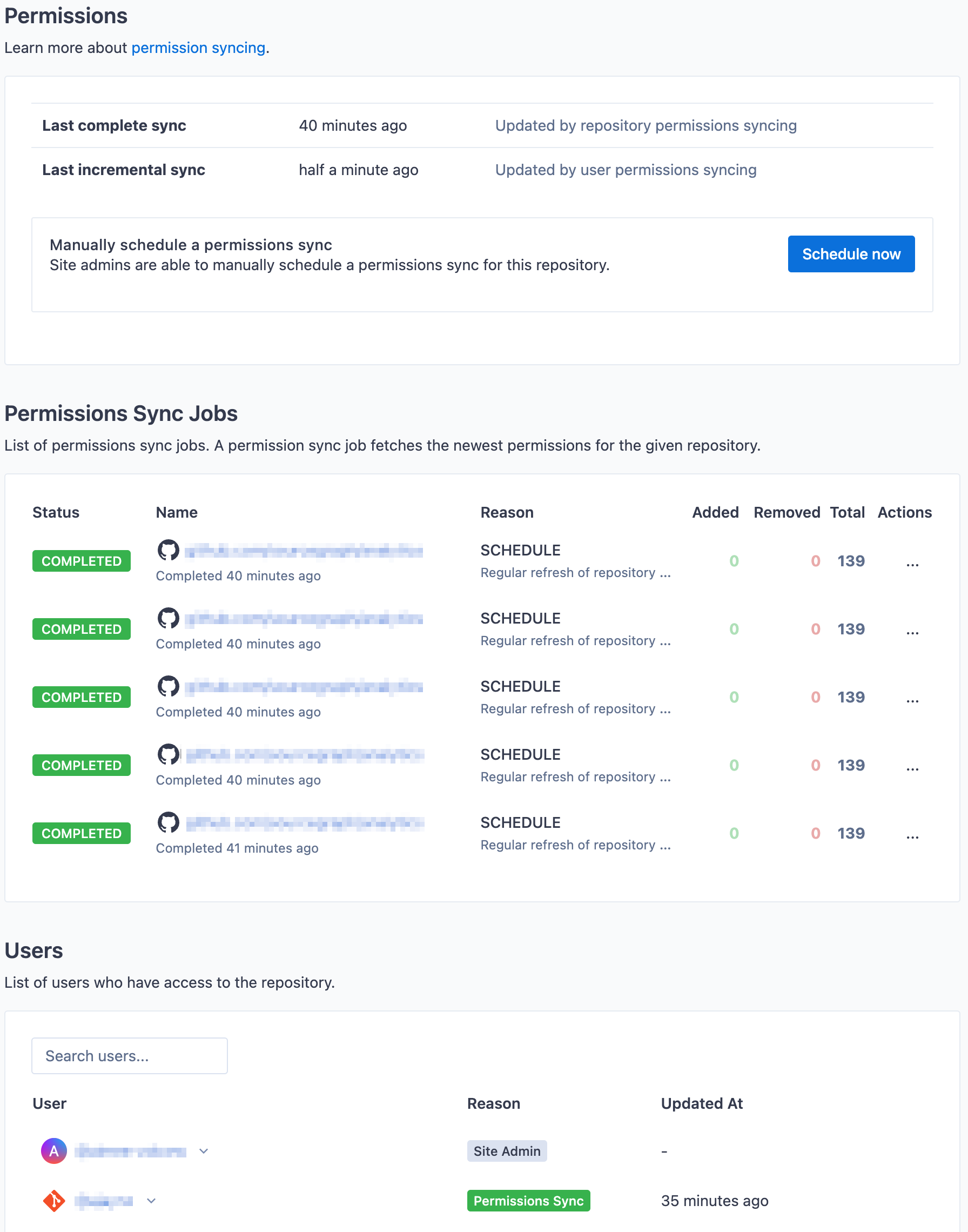
### Verify the state via API calls
before Sourcegraph 5.0
The GraphQL API can also be used:
```graphql
query {
user(username: "user") {
permissionsInfo {
syncedAt
updatedAt
}
}
}
```
Or for the sake of repository:
```graphql
query {
repository(name: "repository") {
permissionsInfo {
syncedAt
updatedAt
}
}
}
```
### Difference between `syncedAt` and `updatedAt`
Because we do double polling with user-centric permission sync running alongside repo-centric permission sync, the `syncedAt`
and `updatedAt` times might be different.
For _user permission sync_, the GraphQL API `syncedAt` indicates the time of last user-centric permission sync for the user
and `updatedAt` indicates the last repo-centric permission sync for any of the repositories the user has access to.
If `syncedAt` is more recent than `updatedAt`, it means the last user-centric permission sync for the user is more recent
than any of the repo-centric permission syncs for the repositories the user has access to.
For _repository permission sync_, the case is orthogonal to the above. The GraphQL API `syncedAt` indicates the time of last
repo-centric permission sync for the repository and `updatedAt` indicates the last user-centric permission sync for any of
the users that can access the repository.
If `syncedAt` is more recent than `updatedAt`, it means the last repo-centric permission sync for the repository is more recent
than any of the user-centric permission syncs for the users that can access the repository.
## Sync duration
When syncing permissions from code hosts with large numbers of users and repositories, it can take a lot of time
to complete syncing all permissions from a code host for every user and every repository. Typically due to internal
rate limits imposed by Sourcegraph and external rate limits imposed by the code host, it can take hours for customers
with large amounts of users or repositories. Please contact the support team for further assistance.
For initial setup of instance, when the initial sync for all repositories and users is running, users will
gradually see more and more search results from repositories they have access to.
### Lag-time
Let's call the time difference between applying the permissions change on code host and the change taking effect on Sourcegraph as **lag time**.
For security reasons, we strive to make the lag time as low as possible.
However given the way the system works, we need to be aware of the worst case:
> IMPORTANT: If there is a change in permissions on the code host, in the worst case the lag time is as long as the time it takes to completely sync all user or repository permissions.
**Example**:
There are `5 000` users, `40 000` repositories and the github.com API is paginated on `100` items per page.
On average, every user has read access to `300` repositories and on average a repository is accessible by `75` users.
User `alice` is removed from repository `horsegraph/not-so-global` at 15:02. How long does it take for this change to take effect on Sourcegraph side?
Let's say rate limiting is not slowing down permission syncing and default settings for permission syncing are used (scheduler runs every 15 seconds and it schedules 10 users with oldest permissions). That means, we schedule 40 users per minute to be synced. To sync all the users takes `5000 / 40 = 125` minutes.
- Worst case scenario:
User `alice` has synced the permissions at 15:01, just one minute before the change is made. This means, `alice` will be scheduled the permissions sync in about 124 minutes again.
- Best case scenario:
User `alice` has synced permissions at 12:58. Next permission sync for `alice` is going to be scheduled at 15:03. So in this case it takes just 1 minute.
So the answer to the question of how long the _lag-time_ is, in the worst case 125 minutes (as long as the full user-permission syncing cycle takes).
### Request count
To calculate how long a full sync takes, it is important to take into consideration many factors - how quickly we
fill the sync job queue, how is internal rate limiter and external rate limiter configured, etc. But in general, we
need to make the following amount of requests to fully sync all the user-centric permissions
(and we double poll, so double the number for repo-centric sync jobs):
```
request_count = ((users * avg_repository_access) / per_page_items) +
((repositories * avg_users_access) / per_page_items)
```
**Example:**
There are `10 000` users, `40 000` repositories and the github.com API is paginated on `100` items per page. On
average, every user has read access to `300` repositories and on average a repository is accessible by `75` users.
We need to make `3M` requests. To cover both user-centric and repo-centric case, it means `6M` requests.
[github.com](https://github.com) has an API rate limit of `5000` requests per hour. In that case, complete
permission sync of all users takes `3M requests / 5000 = 600` hours, which is `25` days approximately.
`25` days to complete a full cycle of permission sync is not great, it can potentially mean `25` days of lag time
mentioned above. Even if we let permission sync consume all the rate limit and we stagger our requests perfectly, which
is rarely the case. Depending on the code host, the rate limit might be much higher, but then we might be
firing huge amounts of requests to the code host.
> IMPORTANT: For permission syncing to be quicker, the code host needs to be able to handle big amounts of requests per hour.
> IMPORTANT: Depending on the customer scale, the amount of users, repositories and the distribution of permissions accross them, the time it takes to fully sync will vary.
> IMPORTANT: We recommend **configuring webhooks for permissions on GitHub** which makes lag time much smaller.
## Configuration
There are variety of options in the site configuration to tune how the permissions sync requests are
scheduled. Default values are shown below:
```json
{
// Time interval between each iteration of the scheduler
"permissions.syncScheduleInterval": 15,
// Number of user permissions to schedule for syncing in single scheduler iteration.
"permissions.syncOldestUsers": 10,
// Number of repo permissions to schedule for syncing in single scheduler iteration.
"permissions.syncOldestRepos": 10,
// Don't sync a user's permissions if they have synced within the last n seconds.
"permissions.syncUsersBackoffSeconds": 60,
// Don't sync a repo's permissions if it has synced within the last n seconds.
"permissions.syncReposBackoffSeconds": 60,
// The maximum number of user-centric permissions syncing jobs that can be spawned concurrently.
// Server restart is required for changes to take effect.
"permissions.syncUsersMaxConcurrency": 1,
// The maximum number of repo-centric permissions syncing jobs that can be spawned concurrently.
// Server restart is required for changes to take effect.
"permissions.syncReposMaxConcurrency": 5
}
```
If the purpose is to fire more requests to the code host, the internal rate limit or the code host rate limit must be also changed accordingly.
Internal rate limiter settings are described on each code host configuration page, but in general, the `requestsPerHour` field needs to be set to the desired number.
### Recommendations
#### Less users than repositories
If there are a lot less users, than repositories, it is better to rely on user-centric perms sync instead of repo-centric sync. In that case, we recommend:
```json
{
// ...
"permissions.syncOldestUsers": 20,
"permissions.syncOldestRepos": 0 // minimum 1 on versions 5.0.3 and older
}
```
This configuration change will schedule `20` users on each scheduler iteration and just `1` repository. That
way, we use the API requests better and user sync will be preferred. This is just an example, please change
the `syncOldestUsers` value to what is desired in your organization.
**Example**:
There are `10 000` users, `40 000` repositories and the desired time to do a full cycle of permission sync is `2 hours`. That
means we need to sync 5000 users an hour. If we keep the `syncScheduleInterval` to `15s` (the default), we schedule 4-times
a minute. `5000/(4 * 60) = 20.8`, so the scheduler needs to schedule 21 users on each iteration to get under the 2 hour mark.
The rate limit for the code host would need to be changed to support the load. In that case the recommendation
is to set it to 2x of the amount of [requests expected from permission syncing](#request-count).
#### More users than repositories
If the situation is reversed, it is recommended to do the opposite than above. Prefer repo-centric
permission sync in these situations:
```json
{
// ...
"permissions.syncOldestUsers": 0, // minimum 1 on versions 5.0.3 and older
"permissions.syncOldestRepos": 20
}
```
**Example**
There are `10 000` users, `5000` repositories and the desired time for a full permission sync cycle is `2 hours`. That means we
need to sync 2500 repositories an hour. If we keep the `syncScheduleInterval` to `15s`(the default), we schedule 4-times
a minute. `2500/(4 * 60) = 10.4`, so the scheduler needs to schedule 11 repositories on each iteration to get under the 2 hour mark.
The rate limit for the code host needs to be changed to support the load. In that case the recommendation
is to set it to 2x of the amount of [requests expected from permission syncing](#request-count).
## Troubleshooting
In some cases, user-centric and repo-centric permission sync can conflict. This typically happens when the code host connection token is misconfigured or expired, but the user token works correctly. A conflict like this can periodically revoke users' access to repositories until the next user permission sync.
### Disable repo-centric permission sync
> IMPORTANT: This feature is only supported in Sourcegraph 5.0.4 and later.
> IMPORTANT: Disabling repo-centric permission sync can break your permission setup depending on your code host and user authentication method. Contact Sourcegraph support before disabling repo-centric permission sync.
To completely disable repo-centric permission sync scheduling, use this site configuration:
```json
{
// ...
"permissions.syncOldestRepos": 0
}
```
## Architecture
Learn about how Permission Syncing fits into Sourcegraph in the [architecture overview](/admin/architecture#permission-syncing).